2026 Top Smart Lectern Types for Global Buyers
Choosing the right Smart Lectern can shape how clearly a speaker connects with an audience. For global buyers, appearance matters, but daily performance matters more. A lectern may look impressive in photographs and still frustrate presenters during a live event. Buyers should examine display brightness, microphone placement, cable management, control access, and height adjustment. Small details become important under bright conference lights.
This guide explores the 2026 Smart Lectern market through practical categories, technical features, and purchasing priorities. It considers intelligent touch displays, integrated audio systems, video conferencing functions, mobile lecterns, and customized institutional models. The discussion reflects common requirements from universities, corporate meeting rooms, government facilities, hotels, and international exhibitions. Reliable suppliers should provide clear specifications, product demonstrations, warranty terms, installation guidance, and responsive after-sales support. Independent testing remains valuable, especially for screen durability, sound clarity, network stability, and heat management.
No model is perfect. A premium lectern can still offer unnecessary functions for a small training room. A budget model may appear efficient, yet its software support could be limited. These differences deserve careful reflection. Buyers should compare real operating conditions, not only product labels or attractive promises. Room size, presenter habits, local service access, connectivity standards, and future upgrade plans all influence the final decision. The best choice is not always the most advanced option. It is the model that performs reliably, remains understandable to staff, and supports professional communication over time.
Smart Lectern Definition and Core Functions
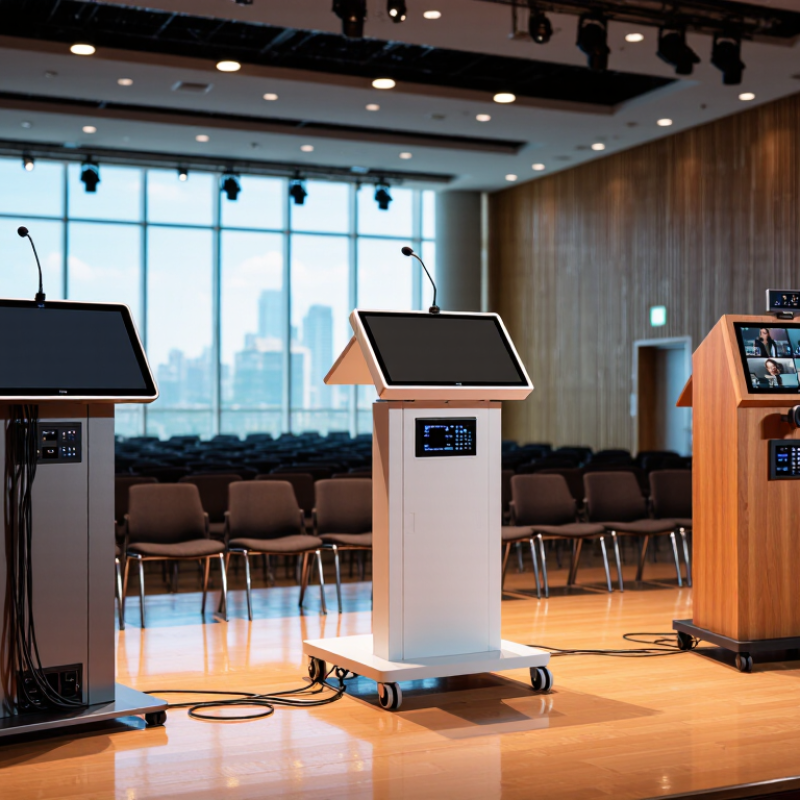
A smart lectern is a connected presentation workstation, not merely a podium with a screen. It combines a display, control panel, microphone interface, computer access, and network connectivity. Some models also include document cameras, built-in speakers, wireless sharing, and adjustable height. Its purpose is practical: help presenters control content, sound, lighting, and audience interaction from one position.
Core functions should remain simple under pressure. A presenter may switch between slides, videos, and live documents without leaving the lectern. Touch controls can manage volume, source selection, room lighting, and display settings. Reliable models support common video inputs, stable network connections, and clear audio pickup. Accessibility also matters. Height adjustment, readable controls, and support for assistive devices improve daily use.
In global purchasing, compatibility deserves careful checking. Power standards, language settings, software policies, and local service capacity can vary widely. Data protection should be reviewed before enabling cloud control or recording functions. A secure login system is useful, but it can also slow an urgent presentation. That trade-off needs testing. Buyers should inspect cable routing, ventilation, screen brightness, and cleaning access. Small design faults become expensive after months of classroom or conference use. A quiet fan may matter more than an impressive specification sheet.
Main Types of Smart Lecterns in 2026
Main Types of Smart Lecterns in 2026
Smart lecterns now serve classrooms, conference halls, training rooms, and public speaking spaces. The interactive touchscreen lectern remains a popular choice. Its built-in display supports presentations, digital annotation, and remote participation. A 15-to-21-inch screen usually offers a practical balance between visibility and desk space. However, bright screens can create glare under strong ceiling lights.
Multimedia lecterns focus on reliable connections. They may include HDMI, USB-C, audio controls, wireless presentation support, and integrated microphones. Height-adjustable lecterns suit schools and shared venues because different speakers can work comfortably. Portable or folding models help smaller organizations move equipment between rooms. From installation experience, cable routing matters more than many buyers expect. Loose cables quickly make a modern lectern look poorly planned.
Tips: Check screen brightness, operating-system compatibility, microphone pickup, and local service support before purchase. Test the lectern with real presentation files, not only a showroom video. Measure doorways and storage areas. Also, leave space for future upgrades. A perfect specification today may feel limited later. I still find that simple controls often outperform complicated interfaces during live events. Reliability wins.
Key Technologies Used in Modern Smart Lecterns
Modern smart lecterns combine touch displays, embedded computers, wireless presentation, and network control. AVIXA’s 2024 Industry Outlook and Trends Analysis valued the global professional audiovisual market at about US$306.4 billion in 2023. It also forecast growth toward roughly US$422 billion by 2029. This expansion reflects stronger demand for flexible teaching and meeting spaces, not just larger screens.
A reliable lectern usually needs a bright 4K display, low-latency touch, and a quiet cooling system. Beamforming microphones can capture speech across a wide desk area. Digital signal processing then reduces echo and nearby ventilation noise. Auto-framing cameras support hybrid sessions, while USB-C and wireless casting simplify presenter changes. Central management can monitor temperature, connection status, and software updates. However, more features can create more failure points. In real installations, poor cable routing still causes embarrassing interruptions. Cybersecurity also matters. The system should use encrypted connections, role-based access, secure updates, and separated networks. These controls should align with recognized security practices and local data requirements.
Tips: Test the lectern with real room lighting, not showroom lighting. Check touch response with dry and slightly wet fingers. Measure microphone pickup from the farthest speaking position. Leave physical space for maintenance. A beautiful interface is not enough if instructors need three menus to start a lesson. International buyers should also verify electrical safety, accessibility, language support, warranty response, and replacement-part availability before approval.
2026 Top Smart Lectern Types for Global Buyers
Key Technologies Used in Modern Smart Lecterns
The chart compares common integrated touch-display sizes used across major smart lectern configurations. Basic interactive models typically use compact 15.6-inch panels, while hybrid conferencing, lecture-capture, and immersive presentation lecterns commonly use 21.5-inch to 27-inch displays. Modern systems may also integrate capacitive touch, 1080p or 4K cameras, microphone arrays, wireless presentation, USB-C connectivity, network control, and real-time speech or content management.
Data represents typical commercial equipment specifications and configuration ranges, not any specific company or brand.
 Skip to main content